Setup
Setup and Download
System Requirements
- Linux, Windows, or Mac computer.
- I recommend using a VPS (Virtual Private Server) from DigitalOcean (droplet)
- Minimum System specs:
linuxrelease channel (Linux on x64 CPU):- ~250MB RAM
javarelease channel (Any OS and CPU):- ~600MB RAM
Don't have enough RAM on your Linux VPS?
Use your hard drive as (slow) RAM: https://linuxize.com/post/create-a-linux-swap-file/
Setup Guides
Downloads
- Windows x64
- Linux: x64 or aarch64 (ARM)
- Mac: M-series CPU or x64 (Intel)
- Alpine Linux (musl): x64 or aarch64
- Other: Python (Universal)
- Recommended with: install uv
Source: https://github.com/rfresh2/ZenithProxy/releases/tag/launcher-v3
Instructions
- Download the above launcher release for your OS and CPU
- Unzip the file.
- Run the launcher in a terminal:
- Linux/Mac:
./launch - Python:
.\launch.bat(Windows) or./launch.sh(Linux/Mac)
- Linux/Mac:
How do I download a file from a Linux terminal?
Use wget:
wget https://github.com/rfresh2/ZenithProxy/releases/download/launcher-v3/ZenithProxy-launcher-linux-amd64.zip
Recommended unzip tools
- Windows: 7zip
- Linux: unzip
- Mac: The Unarchiver
Recommended Terminals
- Windows: Windows Terminal
- Mac: iterm2
Usage
The launcher will ask for required configuration on first launch
Use the connect command to link an MC account and log in once launched
Command Prefixes:
- Discord:
.(e.g..help) - In-game:
/OR!-> (e.g./help) - Terminal: N/A -> (e.g.
help)
How to Rerun Launcher Setup
Run the launcher with the --setup flag. e.g. ./launch --setup
How to exit a running instance
Press the keybind: control + c
Some terminals have alternate keybinds. If all else fails, just close the window
Release Channels
ZenithProxy releases for multiple MC versions and OS/hardware platforms, known as "release channels"
Platforms
- (Default)
java- Works on all systems. Supports Plugins. - (Recommended)
linux- Linux native x64 executable. ~50% reduced memory usage and instant startup
MC Versions
- (Default)
1.21.4- Matches current 2b2t server version - Latest MC version is also usually supported. Other MC versions may exist but are deprecated.
Connecting to or from other MC versions with ZenithProxy's built-in ViaVersion
ZenithProxy's built-in ViaVersion is configured by default to work with any MC version.
It can be configured with the via command
To select a specific release channel, use the channel command
Example: channel set java 1.21.4
To see the current release channel, use the status command, the channel is at the top of the response.
Running on Linux Servers
See the Linux Guide
I highly recommend using a terminal multiplexer - a program that manages terminal sessions.
If you do not use one, ZenithProxy will be killed after you exit your SSH session.
Running Multiple Instances
Create a new folder for each instance with its own copy of the launcher files.
Image
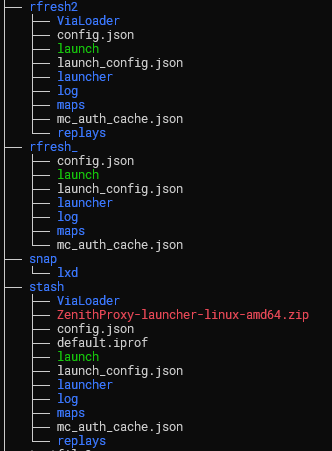
Instances must be independently run and configured. i.e. separate terminal sessions, discord bots, ports, config files, etc.
See the Linux Guide for help copying files, creating folders, etc.
2b2t Limits
2b2t limits accounts without priority queue based on:
- Accounts currently connected per IP address
- In-game session time, excluding time in queue.
Current limits are documented in a discord channel in my server
DNS Setup
To use a domain name you need the following DNS records:
An A record to the public IP address of your server
Image

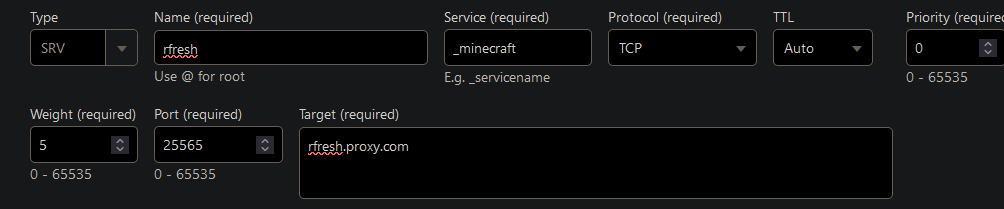
An SRV record for _minecraft._tcp with the port and the A record as its target.
Image